
Wireless security cameras have different wireless ranges depending on the technologies they use, usually operating within a range of 150 feet.
Occasionally, a wireless security camera can work as far as 500 feet.
Homes, office spaces, and most other environments are subject to a lot of interference caused by other wireless devices.
Find out more about wireless ranges below, and how to extend them.
Table of Contents
What is the Range of a Wireless Security Camera?
The average range of a wireless security camera is 150 feet, though some devices are capable of up to 500 feet or higher.
The actual range of a wireless security camera will depend on the model, the range of the router it’s connected to, and the number of competing wireless devices in the vicinity.
How Can I Extend the Range of a Wireless Camera?
While improving the native range of a wireless security camera isn’t possible, below are a few easy fixes that can immediately improve the actual range achieved.
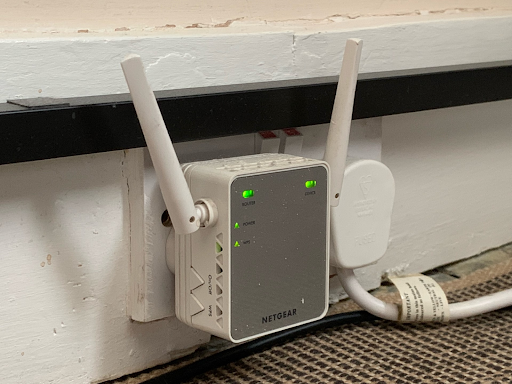
1. Wi-Fi Extender
Extenders are a cost-effective way to increase a Wi-Fi router's range in the home.
‘Repeaters’ are an older technology that’s mostly redundant, so instead consider ‘range extenders’. These rebroadcast the existing radio signal on a different channel from that used by the router.
‘Network extenders’ use a wire to communicate directly with the router.
2. Reduce quality
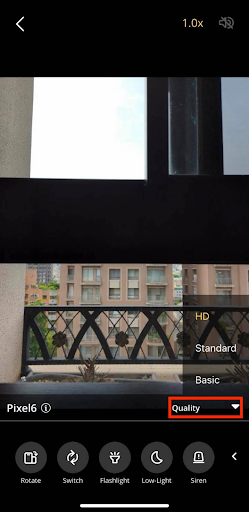
High quality security cameras can be very demanding on upload and download speeds.
Reducing the quality settings will help not only make the camera more functional, but will free up the router for the other devices connected to it.
3. Reduce competition
Homes, workplaces, and public spaces are all subject to dozens of wireless devices competing for signal.
Even other objects that utilize radio waves, like a microwave oven, can have an impact.
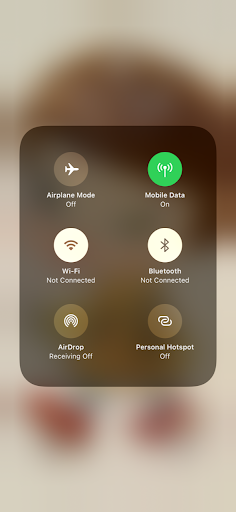
Reducing the number of wireless devices is a certified way to improve the signal strength for a wireless security camera.
Why Is My Wi-Fi So Bad? 5 Common Reasons for Poor Wi-Fi
It’s not uncommon to struggle to get consumer tech like wireless security cameras and smartphones to maintain a decent signal.
This doesn’t usually indicate a problem with the device itself, but the environment it’s contained in. Bad Wi-Fi is caused by:
1. Dense building materials
Radio frequencies must penetrate all the surfaces around them. Bad Wi-Fi is most likely caused by dense building materials in the space, like brick and concrete.
Walls made of drywall aren’t nearly as difficult for wireless signals to pass through as thick concrete, for instance.
2. Too many devices connected
Dozens of devices using the same network at the same time will cause it to become sluggish and, at peak hours, possibly completely unusable.
This depends on the activity of the other devices and neighboring properties.
3. Demanding downloads and uploads
The regular activity of other wireless devices will have a big impact on the overall ‘strength’ of the Wi-Fi.
If two laptops are downloading 4K movies using the same Wi-Fi hub, other devices connected to the hub won’t stand a chance of getting a slice of the Wi-Fi pie.
4. Distance
Wi-Fi routers usually operate on a frequency of either 2.4GHz or 5GHz. 2.4GHz travels farther, but is slower, while 5GHz travels faster within a shorter range.
Modern routers tend to have both.
If the range is too small for the space, the Wi-Fi will be prone to dropping out frequently, and devices may not be able to connect at all.
Security camera models usually specify whether they use 2.4GHz or 5GHz on the box.
For example, popular models like AlfredCam, Wyze Cam v3 and Arlo Pro 4 are compatible with 2.4GHz.
5. Other radio waves
There might be a limited number of devices connected to the router itself, but that doesn’t mean interference isn’t still occurring.
A bunch of wireless radio signals are likely to occupy the same space in a home, office, or public space.
TV remotes, Bluetooth speakers, 4G mobile data from a phone—anything that projects or receives wireless signals is contributing to interference to some degree.
Recommended reading: How Do I Extend My Wi-Fi Range for Free? 5 Tips You Need to Know
FAQ
How do I connect to Wi-Fi that’s too far away?
If Wi-Fi is too far away, there’s little that can be done to the device trying to connect to it other than moving it closer. Increase the range of the router with a Wi-Fi extender. Add one to an area of the house that experiences a particularly unstable connection, and connect devices in that area to the extender rather than the actual router.
How do I extend my wifi range with another access point?
To extend Wi-Fi range using another access point, install a Wi-Fi extender or another router. An extender is generally a more cost-effective solution, but some broadband companies may provide additional routers, so it’s worth inquiring with the provider. Install either the router or extender in an area with poor signal, and then connect wireless devices in that area to it.
Conclusion
Wireless range is rarely specified because it is subject to endless variables that can dramatically impact the real range users get out of wireless devices.
Wi-Fi extenders are a great way to alleviate the strain on wireless routers and increase internet access throughout the home.
They are useful for helping keep security cameras within range in larger homes or homes subject to constant interference.
Recommended reading:
- How Do Wireless Cameras Work? (All You Need to Know)
- Wired vs Wireless Security Systems (A Comprehensive Guide)
- Why Do My Wireless Cameras Keep Disconnecting? | 5 Quick Fixes
- How Often Do You Have to Charge Wireless Security Cameras?
- How to Install Wireless Security Cameras Indoors in 8 Easy Steps (with Pictures)