

Wireless security cameras without subscriptions are rare in the security camera market. That’s because it’s common for key security camera features to be behind a paywall. Wireless security cameras from the likes of Google, Ring, and Arlo all utilize a paywall model. We’ve rounded up some of the best subscription free security camera options below, and addressed your biggest concerns about security camera subscriptions.
Table of Contents
The 6 Best Subscription-Free Wireless Cameras | Security With No Monthly Fees
- Cheapest security camera without subscription – AlfredCamera
- Best Wi-Fi security camera without subscription – Blink Outdoor
- Best design security camera no subscription – Abode iota
- Best doorbell camera without subscription – eufy Video Doorbell
- Best floodlight security camera without subscription – eufy Floodlight Camera 2
- Best security camera for small business without subscription – Reolink 4K Ultra HD Security System
AlfredCamera
Cheapest security camera without a subscription
Available on Google Play Store and the App store. Free, with the option for Premium from just $2.49 a month.
Pros
- No hardware purchase required!
- Super affordable Premium version with innovative features.
- Motion detection, two-way talk, and continuous recording.
Cons
- Functionality depends on the phone/tablet you use.
- Mounting a spare device may require additional accessories.
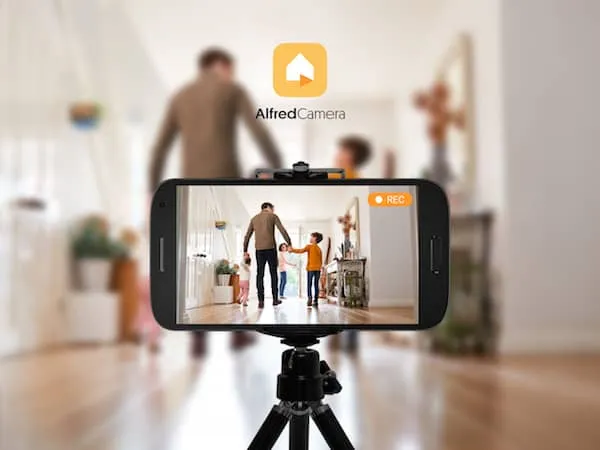
For those on a strict budget, nothing is better than free. AlfredCamera turns old smartphones into robust security cameras, meaning you don’t need to blow hundreds of dollars on a security camera to get 24/7 live streaming, motion detection, and two-way talk.
All the essential features are available as soon as you install the app, while Premium adds brilliant new features, including AI powered detection, for an unbeatable price. It’s a wise option for anyone prioritizing budget that still wants to feel secure in their home or workplace.
Key Specifications
- Live feeds
- Motion detection
- Continuous recording
- Push notifications
- Low-light mode
- Two-way audio
- 7-day free cloud storage
Blink Outdoor
Best Wi-Fi security camera without subscription
Available on Amazon, Best Buy, and Walmart. RRP $99.99.
Pros
- Supports up to 256GB flash drive storage with the Sync Module 2.
- Two-year battery life.
- IP65 weatherproof.
Cons
- No two-way audio.
- Recordings are short.
- Sync Module 2 sold separately.
The streamlined Blink Outdoor is a Wi-Fi-enabled camera. Out of the box, you get up to 1080p HD video and infrared motion detection. There’s also USB local storage support (so long as you purchase an add on peripheral).
Unusually, the camera is powered by AA batteries, making it truly wire-free. As the name suggests, it’s also weatherproof. Though there is a microphone on it, there’s no option for two-way audio.
Key Specifications
- 1080p HD video
- 110-degree field of view
- USB storage via add-on
- Wire-free (uses disposable AA batteries)
- Infrared night vision
- Motion detection
- IP65 weatherproof
Abode iota
Best design security camera no subscription
Available on abode and Amazon. From $245.
Pros
- Attractive design.
- Cross compatible with Google, Alexa, Siri, and other automated devices.
- SD card storage.
Cons
- No person detection.
- Expensive.
- No multi-factor authentication required for its apps.
Abode’s iota is an attractively designed, albeit eye-wateringly expensive, indoor security camera without subscription fees.
Google Assistant, Alexa, and Siri compatible, the iota system records at 1080p HD and has infrared night vision. Catch up with burglars via two-way audio, or scare them off using the built-in siren.
It’s controlled using a sleek fob. Cloud storage is an option, but not required, since footage is easily saved to an SD card.
Key Specifications
- 1080p HD video
- 157-degree field of view
- Plug-in + x 4 AA batteries
- microSD card support
- Motion detection
- Infrared night vision
- Two-way audio
- Built-in siren
eufy Video Doorbell
Best doorbell camera without subscription
Available on eufy, Best Buy, and Amazon. From $199.99.
Pros
- High quality (2K) and fast.
- No subscription fees.
- Easy setup.
Cons
- Expensive upfront cost.
- Sacrifices an ethernet port for the HomeBase.
- 2K video will quickly consume local storage.
The majority of video doorbells require monthly fees to run. eufy’s doorbell can instead interface with a ‘HomeBase’ that plugs into your Wi-Fi router. It’s both the doorbell chime and a 16GB hard drive that stores what the camera records.
Recommended reading: Do I Need a Router for Security Cameras?
High quality is expected thanks to the speedy HomeBase, which helps with 2K video. It records in a 4:3 ratio, which makes it easier to catch facial details in doorways.
eufy Video Doorbell is rechargeable, and battery life lasts up to 180 days. Let the mailman know where to leave a package with two-way audio and preset messages.
Key Specifications
- 2K video
- 160-degree field of view
- Rechargeable battery
- Local storage via a HomeBase (sold separately)
- Smart detection
- Infrared night vision
- Two-way audio
- Built-in siren
- IP65 weatherproof
eufy Floodlight Camera 2
Best floodlight camera without subscription
Available on Walmart, Amazon, and BestBuy. From $145.99.
Pros
- Subscription-free.
- 2,500 lumen LED floodlights.
- Easy connection with Alexa and Google Assistant.
Cons
- Motion activated events only.
- Voice control is limited (can’t control lights).
- No expandable internal memory.
eufy’s line of security cameras has gained a great reception among users for quality, prices, and a lack of monthly fees.
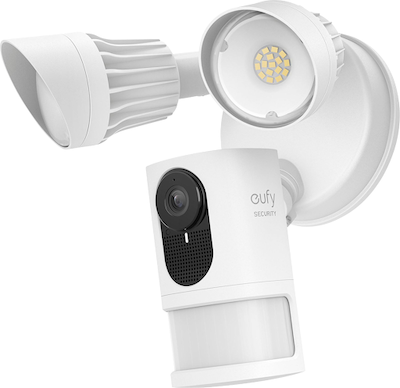
Floodlight cameras are purpose-built for the outdoors, making them essential for monitoring poorly lit exteriors. This 1080p, 2,500 lumen floodlight camera with built-in smart siren is truly a one time purchase.
Key Specifications
- 1080p HD video
- 130-degree field of view
- Wired
- 4GB local storage
- Smart detection
- 2,500 lumen floodlight
- Two-way audio
- Built-in siren
- IP65 weatherproof
Reolink 4K Ultra HD Security System
Best security camera for small business without subscription
Available on Amazon. From $559.99.
Pros
- Plenty of storage, with option for additional external hard-drive up to 6TB.
- High quality 4K footage.
- Inexpensive option for small businesses.
Cons
- Doesn’t support PoE switches (meaning it has to be directly connected to the NVR using cables).
- No two-way audio.
Business places have different security requirements than homes. They need more cameras to effectively monitor the area and therefore more storage for 24/7 recording. Obviously, subscription fees end up very expensive for small business owners.
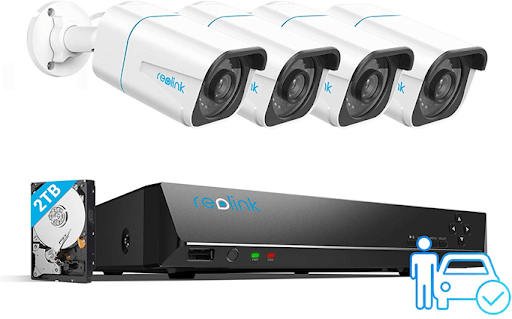
Reolink’s inexpensive 4K Ultra HD Security System comes with four different cameras and a HDD with a massive 2TB of onboard storage. There’s also the option to install up to 6TB of additional storage for backup, making it a solid choice for monitoring small business places.
Key Specifications
- 4K video
- 87-degree field of view
- Wired
- 2TB hard drive, with up to 6TB add-on
- Motion detection
- Infrared night vision
- IP66 weatherproof
Credit: Security.org.
What Are Security Camera Subscriptions For?
While many security cameras require subscriptions for effective use, others provide subscriptions as a choice if the user wants access to advanced features.
What security camera features require subscriptions?
1. Cloud Storage
The most common feature obtained from paying a security camera subscription is cloud storage. IP security cameras without cloud subscription services are few and far between these days.
There’s plenty of benefits to using cloud storage. Losing or breaking the physical device will never jeopardize the footage, and it’s a more practical way to save high quality footage than filling up physical storage devices.
2. Advanced Motion Detection
While you’ll probably find motion detection in security cameras straight out of the box, advanced software features like person detection, animal detection, and object detection require a subscription.
Advanced motion detection features greatly reduce the number of unwanted notifications by narrowing down the conditions for triggering the camera. This is particularly useful for cameras at the front door that see a lot of traffic throughout the day.
Being able to spot packages is also super handy in this context, encouraging users to communicate with the delivery person through two-way audio.
3. Monitoring Services
A less common feature of security camera subscriptions is real-time emergency monitoring. Some IP security camera brands, including Arlo, Ring, and Wyze, have begun implementing this option.
Professional monitoring is a major part of the services provided by larger scale security solution providers, like ADT, and might be necessary in large business operations.
The user’s security cameras and alarms are linked to a monitoring center, and if something is flagged as a security breach, the monitoring team contacts emergency services.
FAQ
Do wireless security cameras require a subscription?
While most security camera subscriptions are there to enable access to cloud storage, some wireless security cameras require a subscription just to view the device’s live feed or playback, in effect meaning you have to pay fees in addition to the upfront cost of the product.
All the picks in our list above work effectively without paying additional fees. AlfredCamera doesn’t require a hardware purchase to use, since its compatible with phones, tablets, and webcams alongside the AlfredCam line.
How much data does a security camera use per month?
The amount of data a security camera consumes per month depends on:
- If it is used continuously or with motion detection enabled.
- The quality settings the user chooses.
A security camera might use as much as 90 GB of data per month if it records 24/7 at high quality. Use motion detection and reduced quality settings to significantly reduce the amount of data a security camera uses in a month.
Advanced motion detection features, sometimes available with a subscription, cut down substantially on unnecessary recording.
Do AlfredCamera cameras record all the time?
AlfredCamera cameras can record all the time by activating Continuous Recording. This records footage in 8-hour loops saved to the device. Find out more about how AlfredCamera can record all the time here.
AlfredCam and AlfredCam Plus also support microSD card storage for continuous recording.
How do I permanently save AlfredCamera videos?
Permanently save AlfredCamera videos by downloading them to your device. Events are motion-enabled clips which can be downloaded to the viewing device.
Moments are manually recorded by the user, and can also be permanently saved by downloading them.
Full 8 hour continuous recording loops can’t be downloaded, but if motion detection is enabled, the motion-enabled events it captures can be downloaded.
How much is AlfredCamera a month?
AlfredCamera is free to download and use.
AlfredCamera Premium gives users the option to deepen their experience for just $29.99 a year (equivalent to $2.49 a month).
Premium adds Supreme quality, zooming, advanced motion detection features, ad-removal, and other cutting-edge features.
Curious about Premium? Try it for a month and cancel anytime!
Conclusion
Wi-Fi enabled security cameras without subscription are available on the market, even though it might seem they are few and far between.
AlfredCamera security cameras give users more choice in how they do security, allowing them to create DIY home security systems that are easy on the wallet even with a Premium subscription, since no hardware purchases are required.
Recommended reading: